Wyze Auto-Lock Bolt v2 Wi-Fi Fingerprint Smart Lock: A Budget-Friendly Way to Ditch Your Keys
As an Amazon Associate we earn from qualifying purchases made through links on this page — it doesn't affect what we score, or how. How this works
 Scored
The Wyze Auto-Lock Bolt v2 fills a real gap in the smart lock market: Wi-Fi, fingerprint entry, and auto-lock, without the premium price tag that usually comes with them. On paper, it's the clear pick for anyone who wants to modernize their front door without a luxury-purchase price. The one open question is track record — it's a promising newcomer rather than a proven veteran. If you're risk-averse, wait for early reviews to land; if you're comfortable being an early adopter at this price point, there's little reason to hold off.
If the combination of price and features lines up with what you need, you can check current availability here: View it on Amazon
Pros
- Genuinely affordable entry point into smart locks — no hub tax, no premium markup
- Built-in Wi-Fi simplifies setup versus hub-dependent competitors
- Fingerprint access adds convenience without needing your phone every time
- Auto-lock is a solid safety net for absent-minded households
Cons
- A newer model, so real-world reliability is still unknown
- Fingerprint sensors on budget locks can get finicky in extreme cold or with wet/dirty hands — worth watching for
- No confirmation of Matter, HomeKit, or Z-Wave compatibility for smart home purists
- As a newer release, long-term durability and firmware support are unproven
Most smart locks want $200+ before you've even touched the app. The Wyze Auto-Lock Bolt v2 stays under $80 and still gives you fingerprint entry, auto-locking, and remote app control — no hub required. If you've been putting off a smart lock purely because of the price, this is the one worth a second look.
What It Is
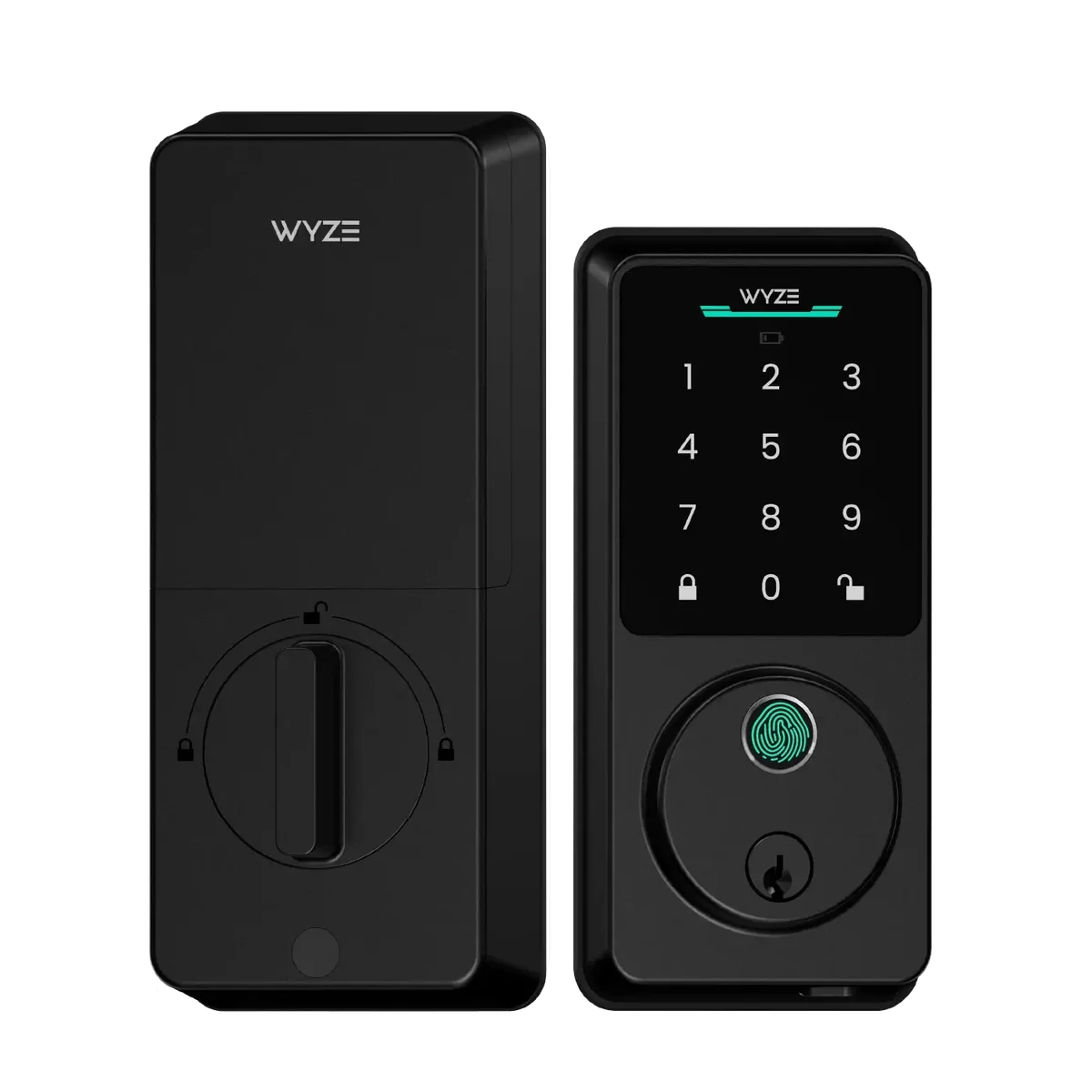
The Wyze Auto-Lock Bolt v2 is a Wi-Fi-connected deadbolt replacement with fingerprint recognition, auto-locking, and remote control through the Wyze app. It's the follow-up to Wyze's original smart lock, and the "v2" branding suggests a refined second attempt rather than a first draft. Built-in Wi-Fi means no separate bridge or hub is needed for remote access — a real simplification compared to competitors that tack on an extra accessory purchase just to get the same functionality.
As a deadbolt replacement, it's built to swap in for your existing single-cylinder deadbolt on standard doors, keeping a physical key backup while layering smart features on top.
Who It's For
This lock makes the most sense for:
- First-time smart lock buyers who want to test the waters without a premium investment
- Renters and homeowners on standard doors who don't want a complicated retrofit
- Households that want fingerprint access for kids, roommates, or guests without handing out physical keys or codes
- Wyze ecosystem users already running Wyze cameras or sensors who want everything under one app
If you're after deep smart home integration — Matter, HomeKit, elaborate automations — this will feel basic next to pricier locks built for that crowd. But for someone who just wants to stop fumbling for keys, it hits the right notes.
Key Features & Specs
- Built-in Wi-Fi — connects directly to your network, no separate hub required for remote locking/unlocking
- Fingerprint recognition — quick biometric entry alongside traditional methods
- Auto-lock — the door secures itself after closing, useful for anyone who constantly second-guesses whether they locked up
- App control via Wyze app — remote lock/unlock, activity history, and presumably guest access management
- Deadbolt replacement design — fits standard doors, retains a physical key backup
- Price: under $80 — lower-to-mid end of what smart locks typically cost
Also on the bench
Others in this category:
- Does Aqara P1 Need a Hub? Yes — With One Caveat Worth Knowing
- Wyze Cam without Subscription — What Actually Works
- Kasa HS220 Neutral Wire Required? Yes — With One Caveat Worth Knowing
- Wyze Cam v3 vs v4 — Every Spec Difference That Actually Matters
- Kasa HS220 vs KS220 — Every Spec Difference That Actually Matters